Phones & Mobile · Explainer
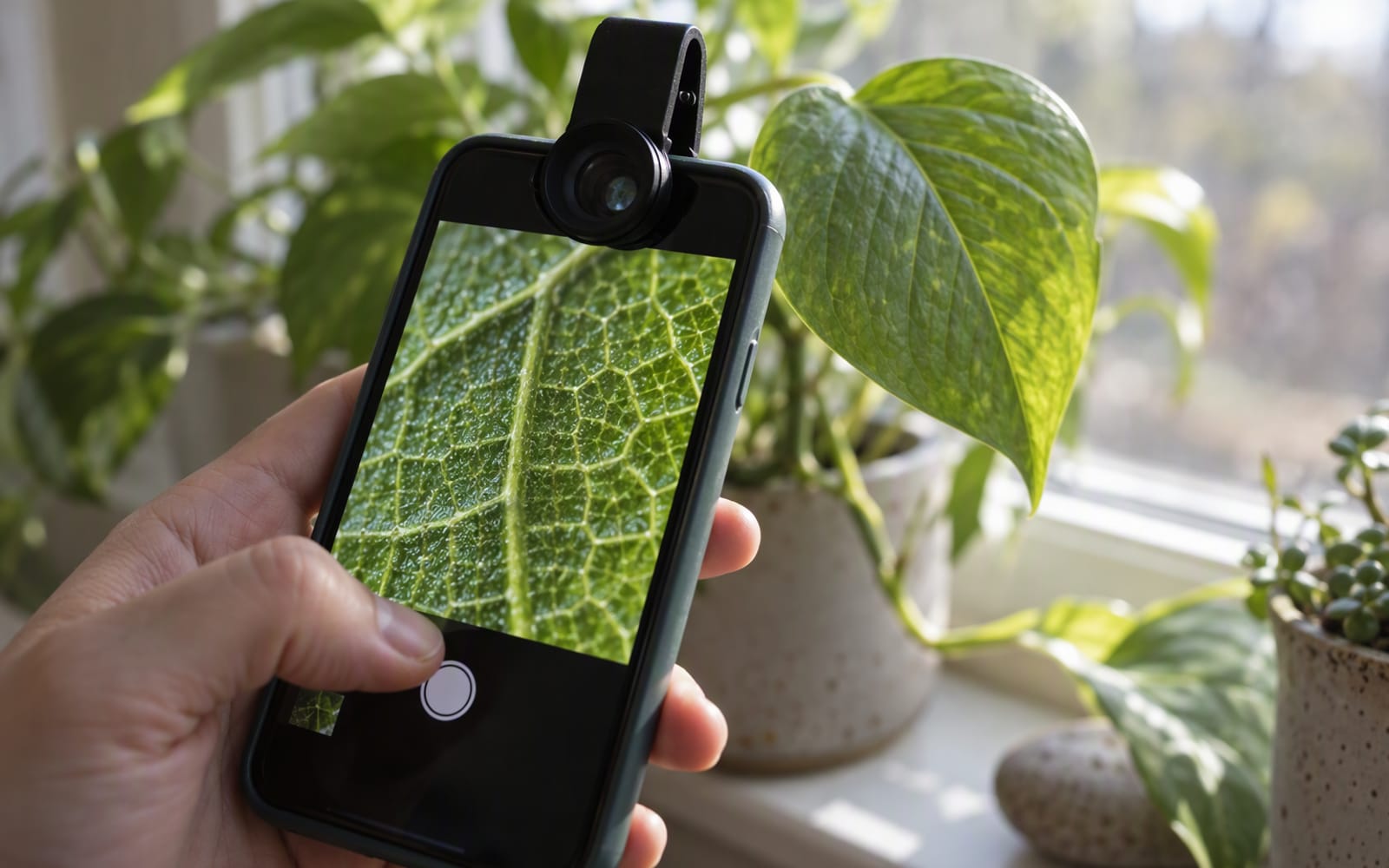
You are trying to photograph the engraving on the inside of a ring, or the veins on a leaf, or a single stitch in a piece of fabric. You move the phone in close, the image on screen sharpens, then snaps to a blurry mess, and the camera refuses to focus any nearer. That is the minimum focus distance of the built-in lens doing its job, and it is the most common reason people go looking for an add-on lens.
The honest starting point is that most of those purchases make photos worse, not better. But there are two situations where an add-on lens genuinely adds something the phone cannot do on its own, and it is worth knowing the difference before you spend anything.
Why most add-on lenses are a downgrade
A clip-on lens puts more glass in front of a camera that was already carefully designed. The phone’s lens and sensor are matched; the add-on is not. The usual results are softer corners, more flare, visible vignetting and a small loss of light.
The bigger problem is that most add-on lenses do not add capability at all. A wide-angle clip-on duplicates a lens your phone already has. A telephoto clip-on duplicates a zoom you can already use, usually with worse results than the digital zoom it replaces. A fisheye is a novelty you will use twice.
Rule of thumb. An add-on lens earns its place only if it produces a photograph your phone physically cannot take. If the phone can already take that shot, the accessory is a filter with extra steps.
So the test for buying is simple: name the shot you want, and check whether your phone can already take it. In almost every case it can. There are two exceptions.
Case one: macro beyond the minimum focus distance
The first genuine exception is close-up work. Every phone lens has a minimum focus distance — the nearest point at which it can still focus. Move closer than that and the image simply will not sharpen. No software setting changes this, because it is a property of the optics.
A clip-on macro lens shifts that limit closer. The Sandmarc Micro Lens is built for exactly this: it lets you get nearer than the built-in camera allows, which is a real change in what the phone can photograph rather than a stylistic effect. Based on published specifications, it uses multi-element glass and suits product photos, nature close-ups and craft documentation — situations where the subject is small and the detail is the point.
Two honest warnings come with it. First, the depth of field is razor thin, so a tripod or very steady hands matter more than usual. Second, alignment with the phone’s lens takes practice, because the lens has to sit centred over the correct camera or you get a soft, off-axis frame.
Case two: anamorphic character
The second exception is anamorphic video. An anamorphic lens squeezes a wide image onto the sensor, which the editor then stretches back out. The result is a wider field of view with a specific look: horizontal flares, oval highlights instead of round ones, and a shallower sense of depth.
The Moment Anamorphic 1.33x Lens is the clearest example of an add-on that changes the character of footage rather than just the framing. It uses a 1.33x horizontal squeeze for a widescreen look. It is a deliberate aesthetic, not a neutral improvement — if you do not want the flare and the squeeze, you do not want this lens. It also needs a compatible phone case mount to attach, and the footage has to be de-squeezed in editing software afterwards.
The point is that this look is an optical behaviour. It is not the same as a phone’s cinematic video mode, which changes depth of field and frame rate, not lens geometry.
Why software cannot replicate either
It is tempting to assume that a filter or an editing preset covers both cases. It does not, and the reason is the same for each.
For macro, the limitation is physics. If the lens cannot focus at that distance, no software recovers the detail, because the information was never captured. Sharpening a blurred frame produces a sharper blur.
For anamorphic, the limitation is geometry. A filter can add a fake flare and can crop to a wider aspect ratio, but it cannot create the horizontal compression that makes the oval highlights and the wide-then-de-squeezed framing possible. Presets imitate the surface of the look, not its cause.
That distinction — a real optical change versus a simulated one — is the entire argument for owning either of these two lenses and no others.
Alignment and mounting friction
Both lenses share a practical weakness: mounting. A clip-on has to be positioned precisely over the correct camera lens, and it can shift when the phone moves. A mount-and-case system is more secure but adds a case you have to keep on the phone.
This friction matters more than any specification, because it decides how often the lens is actually used. If attaching it takes a minute and a case you do not otherwise want, the lens stays in a drawer. If you can leave the mount on the phone permanently, you will use it far more.
If you shoot in a case that will not accept the mount, or you change phones often, factor that in before buying.
Our picks compared
| Sandmarc Micro Lens | Moment Anamorphic 1.33x Lens | |
|---|---|---|
| What it adds | Closer focusing than the built-in camera | A wide, cinematic anamorphic look |
| Best for | Product photos, nature, craft detail | Short films, music videos, wide shots |
| Mounting | Clip-on, needs careful alignment | Requires a compatible case mount |
| Main trade-off | Razor-thin depth of field | Needs de-squeezing in editing |
| Software substitute | None — it is an optical limit | None — presets imitate, not reproduce |
What not to overpay for
- A lens kit with several attachments. You will use one, maybe two. The rest is padding.
- A wide-angle or telephoto clip-on. Your phone already covers both, usually better.
- Filters sold alongside the lenses. A polariser has a real effect, but it is not the reason to enter this category.
- Cheap unbranded macro lenses. The whole value is optical quality; a poor macro lens adds the ability to get close and then wastes it.
When you should not buy anything
If you want to photograph small things occasionally, first try the phone’s own close-up or macro mode if it has one, and try backing off slightly and cropping instead. Many recent phones focus close enough for casual detail shots, and cropping a sharp frame beats a soft close-up.
Buy an add-on lens only when you can point to the specific shot your phone keeps refusing to take. For most people that is never. For the two cases above, it is a genuine gap in the phone’s abilities, and a well-made lens is the honest way to close it.
Our picks
These are the models we would shortlist for the scenarios in this article. Each entry shows the published specification highlights, what the product is genuinely good at, and what you give up.
Sandmarc Micro Lens
Sandmarc
Add-on lenses only make sense for the shots your phone physically cannot take. Macro is the clearest case: a clip-on lens gets you closer than the built-in camera allows, and that is a real capability gain rather than a filter.
What it does well
- Genuinely closer focusing than built-in cameras
- Sharp in the centre of the frame
- Small enough to keep in a pocket
What to accept
- Requires very steady hands or a tripod
- Depth of field is razor thin
- Alignment with the phone lens takes practice
Best for: Product photos · Nature close-ups · Craft documentation
Published specs: Clip-on macro lens for smartphones; Multi-element glass construction; Works with most phone camera layouts; Compact carry case.
Last checked: 2026-09-22
Moment Anamorphic 1.33x Lens
Moment
The one add-on lens that changes the character of phone footage rather than just its field of view. The squeeze, flare and oval bokeh are a deliberate look — if you do not want that look, you do not want this lens.
What it does well
- Distinctive cinematic character
- Wider field of view than the built-in lens
- Noticeably better than software filters
What to accept
- Needs a mount and a case to attach
- Requires de-squeezing in editing software
- Expensive for an accessory
Best for: Short films · Music videos · Wide cinematic shots
Published specs: Anamorphic add-on lens for smartphones; 1.33x horizontal squeeze for a widescreen look; Multi-coated glass; Requires a compatible phone case mount.
Last checked: 2026-09-22
Frequently asked questions
Do add-on phone lenses improve photo quality?
Usually the opposite. A clip-on lens puts extra glass in front of a camera that was already designed as a matched system, which tends to soften corners, add flare and reduce contrast. The reason to buy one is not better quality but a capability the phone does not have, such as focusing closer than its built-in lens allows. If the phone can already take the shot, an add-on lens rarely improves it.
Can I get close-up macro shots without a clip-on lens?
Sometimes. Many recent phones have a dedicated close-up or macro mode, and backing off slightly then cropping a sharp frame often beats a soft close-up. If your phone will not focus close enough for the detail you need, that is the specific gap an add-on macro lens fills. It is an optical limit, so no setting or app changes it.
Is an anamorphic lens worth it for casual video?
Probably not. An anamorphic lens adds a specific cinematic look — horizontal flares, oval highlights and a wide, squeezed field of view — that you then have to de-squeeze in editing. It is a deliberate style rather than a neutral upgrade. If you do not want that look, or you do not edit your footage, the lens will not earn its place.
Why do clip-on lenses need careful alignment?
Because the clip-on has to sit precisely over the correct camera lens on the back of the phone. If it is off-centre, the image is soft and the frame is off-axis, and a small shift while filming makes it worse. A mount-and-case system holds the lens more securely, which is why it is often the more practical option despite the extra bulk.
Related

Mobile
Best Phone Gimbals for Vlogging on a Budget
A phone gimbal does not make you a filmmaker. Here is what actually matters when buying one for vlogging, and when a small tripod is the smarter buy.

Mobile
Best Power Banks for Long-Haul Flights
Airline rules decide which power bank you can carry. Here is how to choose one for a long-haul flight, from laptop charging to the weight in your bag.
Mobile
MagSafe Accessories That Are Actually Worth It
Magnetic accessories are not all gimmicks. Here is which MagSafe batteries, stands and grips solve a real problem, and which ones you can skip.